ETA PRIME Video Summaries
AI-generated English translations of new videos. A no-sign-up video summary & translation page
 📺 SteamOS On Your Phone! #gaming #etaprime #pcgaming
Droid Deck Brings SteamOS and Local PC Game Emulation to Android Devices
▼
An overview of Droid Deck, an Android application that provides a SteamOS-style interface and local PC game em…
An overview of Droid Deck, an Android application that provides a SteamOS-style interface and local PC game emulation on Android phones, tablets, and handheld devices without rooting or replacing Android. The demonstration focuses on running x86 Steam games through Proton and Fex layers rather than cloud gaming or remote streaming.
■ Droid Deck overview
- Android app offering a full SteamOS-style interface
- Runs locally without root and without replacing Android
■ Compatibility and demonstration
- Works on Android phones, tablets, and Android gaming handhelds
- Cyberpunk 2077 demo on a Red Magic 11 Pro with Snapdragon 8 Elite Gen 5 and 16 GB RAM
- Medium settings and 60 fps reported in the demonstration
■ Scope
- Local x86 game emulation through Proton and Fex
- Not cloud gaming or streaming from another PC
This is suitable for viewers curious about running PC games on Android hardware. It provides a concise look at the app's purpose, supported devices, and demonstration scope before the full installation and gameplay content.
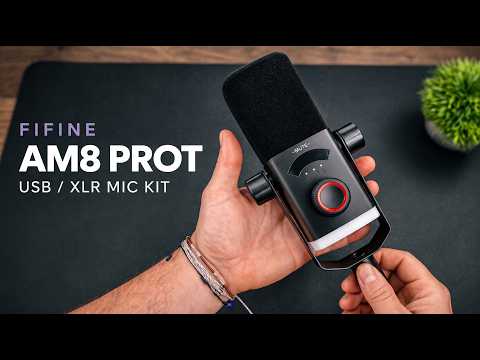 📺 A Solid $79 Streaming Mic Kit! FIFINE AmpliGame AM8 Pro T Review
Fifine Ampligame AM8 Pro T USB/XLR Streaming Microphone Review
▼
The review examines the Fifine Ampligame AM8 Pro T, a dynamic USB/XLR streaming microphone supplied with an in…
The review examines the Fifine Ampligame AM8 Pro T, a dynamic USB/XLR streaming microphone supplied with an integrated RGB boom arm and desk clamp. It covers the included accessories, onboard controls, RGB lighting, Genie software, and a USB voice-over recording test.
■ Hardware and included accessories
- Dynamic capsule with metal grille, pre-installed metal mount, and desk clamp
- Rear 3.5 mm headphone jack, RGB button, USB-C port, and full-size XLR port
- Integrated USB cable in the boom arm, touch mute, LED level indicators, and three-function control dial
- RGB ring on the microphone and RGB lighting on the boom arm
■ Controls and software
- Dial modes for microphone gain, headphone monitoring, and mix balance; tap-to-mute control
- Genie software for Windows with EQ and RGB control, including synchronized or separate settings, custom color, and brightness adjustment
■ Audio test and pricing
- USB-only voice-over test recorded in Final Cut without additional noise-reduction processing
- XLR connectivity noted for future mixer upgrades; the demonstrated recording uses USB
- Price around $79 on Amazon, with a non-RGB version available at a lower cost
It is suited to viewers considering an all-in-one USB/XLR microphone for podcasting, streaming, or game commentary and who want an overview of its features, controls, software compatibility, and pricing. Viewers can use it to understand the package and setup options before deciding whether to check the linked product information.
 📺 I Put a 16GB RTX GPU in This TINY Ryzen Gaming PC!
Building a 2.5L Gaming PC with a 16-Core Ryzen 9 and NVIDIA RTX 2000
▼
A compact gaming build is assembled around the Minisforum MSA2 chassis, an AMD Ryzen 9 9955HX processor, and a…
A compact gaming build is assembled around the Minisforum MSA2 chassis, an AMD Ryzen 9 9955HX processor, and a 16 GB NVIDIA RTX 2000 workstation GPU, bringing the system to about 2.5 liters. The build addresses the chassis’s single-slot low-profile GPU limitation through a dual-slot low-profile card, a replacement bracket, and a 3D-printed cover. Power is supplied by an external 280 W adapter.
■ System foundation and GPU fit
- Minisforum MSA2 context and internal PCIe slot
- Dual-slot low-profile RTX 2000 installation and bracket change
- 3D-printed cover design from Printables
■ Power and specifications
- Ryzen 9 9955HX 16-core/32-thread CPU and 65–80 W power settings
- RTX 2000 16 GB GDDR6 GPU powered via PCIe
- External 280 W power supply
■ Testing and use cases
- Geekbench, OpenCL, and 3DMark overview
- 1440p game testing with DLSS and frame generation
- Thermal observations during gaming
Viewers interested in small-form-factor PC building, low-profile GPU upgrades, and 1440p gaming performance will find a practical overview of component choices, fitment considerations, and thermal behavior. It provides context for assessing similar compact builds and deciding which tests or modifications to explore further. Those planning a similar build can use the described component and testing overview as a starting point and refer to linked resources for the printable cover and parts.
 📺 They Put a 16GB RTX GPU in This TINY PC! ACEMAGIC G3A First Look
AceMagic G3A Mini Workstation Overview: Core i9-13900F, RTX 2000 Ada, and 65 W CPU Limit
▼
An overview of the AceMagic G3A mini workstation, centered on its compact vertical form factor, desktop Intel …
An overview of the AceMagic G3A mini workstation, centered on its compact vertical form factor, desktop Intel Core i9-13900F, and NVIDIA RTX 2000 Ada GPU with 16GB VRAM. The content examines the exterior and port layout, internal upgrade access, default 65 W CPU power limit, local AI workloads, 1440p gaming, and measured thermal and power behavior.
■ Hardware and design
- Compact vertical chassis, aluminum stand, front and rear I/O, external 230 W power supply
- Intel Core i9-13900F, NVIDIA RTX 2000 Ada 16GB, 32GB DDR5, internal upgrade access
■ Performance coverage
- Default 65 W CPU power limit and its effect on clock behavior
- Local AI and image generation, 1440p gaming with DLSS/frame generation, thermals and wall power draw
■ Sponsor segment
- Windows 11 Pro and Office 2024 Professional Plus license keys via URCDKey with a discount code
This overview is suited to viewers evaluating a compact AI and gaming workstation under a restricted power envelope. It provides a neutral summary of the tested configuration and performance areas, while noting that further power-limit tuning is left for a follow-up. Viewers can use it to decide whether the default G3A configuration matches their needs and to check the description for product and sponsor links.
 📺 Walmart’s $29 Black Friday Phone Is INSANE For Emulation!
$30 Straight Talk Moto G Power (2026): Activation Workaround, Specs, and Emulation Test Overview
▼
Walmart's Straight Talk-exclusive Motorola Moto G Power (2026) is presented at $29.88, with a focus on using i…
Walmart's Straight Talk-exclusive Motorola Moto G Power (2026) is presented at $29.88, with a focus on using it as a Wi-Fi-only Android and emulation device rather than a primary phone. The content explains the activation screen limitation and an Android DPC/test DPC QR-based setup method to bypass activation for Wi-Fi use. It also reviews the phone's hardware, gaming features, and emulator performance across several platforms, along with USB-C controller and display-output considerations.
■ Device and purchase context
- $29.88 Walmart Straight Talk exclusive; delivery experience mentioned
- Locked to Straight Talk/Verizon network; activation required during setup
■ Setup workaround
- Wi-Fi-only setup is blocked by the activation screen
- Android DPC/test DPC QR setup described as a bypass method
■ Hardware and software
- 6.8-inch 120Hz LCD, MediaTek Dimensity 6300, 8GB RAM, 128GB UFS 2.2
- 50MP main, 8MP ultrawide, 32MP selfie, 5200mAh, Android 16
- microSD support, Wi-Fi 5, Bluetooth 5.4, NFC, GPS, USB-C 2.0
■ Gaming and emulation
- Built-in game mode with performance/turbo settings and FPS overlay
- Overview of Android games and emulators including PSP, GameCube, PS2, and 3DS
- Results described as title-dependent; USB-C controller use and Motorola Smart Connect mentioned
Viewers interested in budget Android hardware, Wi-Fi-only device repurposing, or emulation testing can use the overview to assess the deal's scope. Those considering purchase should verify activation requirements and compatibility with their intended controllers and emulators.
 📺 Minisforum M2 Slim Hands On First Look!
First Look at the Minisforum Elite Mini M2 Slim 304 Mini PC
▼
This overview examines the Minisforum Elite Mini M2 Slim 304, a compact metal mini PC offered with 8GB, 12GB, …
This overview examines the Minisforum Elite Mini M2 Slim 304, a compact metal mini PC offered with 8GB, 12GB, or 16GB integrated memory and 256GB or 512GB UFS 3.1 storage. It covers the package contents, port layout, hardware specifications, everyday desktop use, 4K video playback, benchmark comparisons, and light gaming and emulation testing.
■ Hardware and design
- Metal chassis, compact form factor, and included mounting accessories
- Intel Core 3 304 processor, integrated Intel graphics with one Xe3 core, Wi-Fi 6E, Bluetooth 5.4, and Windows 11
■ Memory, storage, and connectivity
- 8GB, 12GB, or 16GB integrated memory; 256GB or 512GB UFS 3.1 storage; M.2 2280 expansion slot
- Front USB 3.2 Gen 2 and 3.5mm audio; microSD slot; rear HDMI 2.1, USB4 40Gbps, dual 2.5GbE, USB 2.0, and power input
■ Usage and testing
- Daily desktop tasks such as web browsing, email, document editing, and light image editing
- Four simultaneous 4K 60fps YouTube streams for digital signage or monitoring scenarios
- Benchmark comparisons with Intel Core i3 N305 and Intel N200
- Light PC gaming and GameCube and PlayStation 2 emulation
This first-look overview is suited to viewers considering a compact desktop for basic productivity and media playback, or those comparing small-form-factor PCs. It provides a clear view of the device's specifications, connectivity, and tested use cases without presenting the full benchmark details.
 📺 Intel Arc's Secret Weapon Was Turned OFF On SteamOS… Until Now! (+29% FPS)
Boosting Intel Arc GPU Performance on Linux and SteamOS with the XESS XMX Modified Driver
▼
This video shows how a modified driver project called XESS XMX Linux, available on GitHub, enables Intel Arc G…
This video shows how a modified driver project called XESS XMX Linux, available on GitHub, enables Intel Arc GPUs to activate their dedicated XMX engines for XeSS upscaling on Linux and SteamOS. The presenter walks through the installation process step by step and runs performance benchmarks across several games before and after applying the driver.
■ Installation and Setup
- Overview of Intel Arc B570 and its XMX engine behavior on Linux
- Downloading and installing the XESS XMX Linux driver from GitHub
- Configuring per-game launch commands (Cyberpunk 2077 example)
- Rebooting and shader recompilation considerations
■ Performance Comparisons
- Cyberpunk 2077, Forza Horizon 6, Spider-Man 2, Witcher 3, Red Dead Redemption 2
- Measured frame rate differences between the stock and modified drivers
■ Compatibility and Future Outlook
- Applicability to integrated and discrete Intel Arc GPUs, SteamOS, and Bazzite
- Additional resources referenced in the video description
This video is intended for Intel Arc GPU owners running Linux or SteamOS who want to extract more gaming performance from their hardware. After watching, viewers will understand how to install the modified driver, configure game launch options, and know what kind of performance changes to expect across different titles.
 📺 The Best Barebones Mini Gaming PC Deal Right NOW!
Building and Testing the ROG NUC 14 Barebones Mini Gaming PC
▼
A used ROG NUC 14 barebones unit picked up on eBay is assembled, upgraded, and tested to see what a compact RT…
A used ROG NUC 14 barebones unit picked up on eBay is assembled, upgraded, and tested to see what a compact RTX 4070 gaming PC can deliver at 1440p. The process covers part selection, installation, benchmarks, and real-game performance, along with a sponsor segment on discounted software keys.
■ Barebones Mini PC Overview
- Unboxing: ROG NUC 14 with Intel Core Ultra 9 185H and RTX 4070, stand, and 330W power supply
- Opening the case and looking at the internal layout, including three M.2 slots
- Non-ROG ASUS NUC 970 variant with the same specifications
■ Upgrades and Setup
- Installing 16GB of DDR5 SODIMM memory (2x8GB, 4800MT/s) and a 512GB SSD with Windows 11 preloaded
- Notes on current RAM, storage, and power-cable costs
- BIOS update and Armory Crate performance modes
■ Benchmark and Gaming Tests
- Geekbench 7, 3DMark Steel Nomad, and Time Spy scores
- Red Dead Redemption 2, Forza Horizon 6, Cyberpunk 2077, and Crimson Desert at 1440p with DLSS settings compared
- RAM and VRAM usage observations, including frame generation
■ Verdict and Sponsor Segment
- Cost perspective on building this setup versus buying new
- URCDKeys Windows 11 Pro and Office 2024 Professional Plus key discounts
This is aimed at viewers considering a small-form-factor gaming PC or browsing barebones listings on eBay. You will learn what parts are required, how the system is assembled, and what performance and memory limits to expect before deciding to build one.
 📺 I Turned The New EVO X1 Into a Powerful All-AMD Steam Machine!
GMK Tech Neo X1 Mini PC: SteamOS Setup and Radeon RX 9070 XT Performance Testing
▼
A walkthrough of swapping the RTX 5070 GPU for a Radeon RX 9070 XT in the GMK Tech Neo X1 mini PC, installing …
A walkthrough of swapping the RTX 5070 GPU for a Radeon RX 9070 XT in the GMK Tech Neo X1 mini PC, installing SteamOS via a Steam Deck recovery image, and benchmarking game performance at 1440p and 4K across multiple titles. The video covers the hardware assembly process, system configuration, and how each game performs with and without FSR scaling.
■ Hardware Build & Setup
- Neo X1 stock configuration with RTX 5070 and Ryzen 9 9955HX 3D (16 cores / 32 threads, 64GB SODIMM RAM, 120mm AIO cooler)
- ASRock Radeon RX 9070 XT (16GB) installation with 12VHPWR-to-dual 8-pin adapter
- Dual-boot setup with stock SteamOS 3.9.5 alongside Windows
■ Game Performance Testing
- Red Dead Redemption 2, Crimson Desert, and Doom: The Dark Ages at 1440p and 4K
- Forza Horizon 5, Spider-Man 2, and Cyberpunk 2077 with FSR 4/4.1 comparisons
- Ray tracing behavior on Radeon under SteamOS and Proton GE
■ System Overview
- Stock SteamOS functionality including Wi-Fi, Bluetooth, and Steam controller support
- TDP/TGP control limitations within SteamOS and third-party tool options
This is useful for viewers considering a Neo X1 purchase, those interested in running SteamOS on non-Deck hardware, or anyone evaluating Radeon GPU performance in a mini PC form factor. It helps clarify what to expect from game settings, FSR usage, and ray tracing before making hardware or configuration decisions.
 📺 Intel’s Fastest iGPU Yet! Core Ultra X9 388H + 9600 MT/s RAM Tested
Intel Core Ultra X9388H Mini PC Review: Arc B390 with 9600 MT/s RAM
▼
A mini PC featuring Intel's Core Ultra X9388H and the Arc B390 integrated GPU is put through its paces, with a…
A mini PC featuring Intel's Core Ultra X9388H and the Arc B390 integrated GPU is put through its paces, with a focus on how its faster 9600 MT/s memory affects performance. The review covers benchmark comparisons against the X7 358H, power draw checks, and real-world gaming tests.
■ Benchmarks and Power
- Geekbench 7, Cinebench R24, Geekbench AI (CPU and AI performance)
- 3DMark Steel Nomad and Time Spy (GPU performance with faster RAM)
- Power consumption under load, including combined CPU and GPU draw
■ Gaming Tests
- Cyberpunk 2077 at 1080p and 1440p, including XeSS frame generation
- Red Dead Redemption 2 and Ratchet & Clank: Rift Apart
- Doom: The Dark Ages and Crimson Desert, with XeSS usage notes
■ Wrap-up
- Reasons the X9 model has seen limited release
- Possible Linux and Steam OS testing in a future video
This is useful for anyone considering a compact Panther Lake system or weighing the X9 against the X7, as it shows how memory speed translates into actual CPU, GPU, and gaming results. Viewers get a clear picture of what to expect from this configuration and which settings work at different resolutions.
 📺 This Keychain Power Bank Is the Size of a Snickers Bar! INIU SnapGo P81
Review of the iNew Snap Go P81 Ultra-Compact Power Bank
▼
This review covers the iNew Snap Go P81, a keychain-sized 5000mAh power bank with 20W fast charging, a built-i…
This review covers the iNew Snap Go P81, a keychain-sized 5000mAh power bank with 20W fast charging, a built-in USB-C cable, and a wireless charger for Apple and Samsung watches. The presenter walks through its design, features, color options, and real-world output measurements to help viewers decide whether it fits their daily carry.
■ Design & Features
- Keychain-friendly form factor with a spring-loaded metal clip
- Built-in USB-C cable and an additional USB-C port for longer cables
- LCD screen showing remaining battery percentage
- Integrated wireless charging pad for Apple Watch and Samsung Watch
- Color options including white, mint green, purple, blue, pink, and dark gray/blue
- Weighs 4.1 oz and includes smart thermal protection to extend battery life
■ Testing & Real-World Use
- Output test using a watt meter shows approximately 19W through the built-in cable and about 18.8W through the bottom USB-C port
- Demonstration of charging handheld gaming devices and smartwatches on the go
- Discussion of how the short built-in cable length can be addressed with the additional port
This video is suited for anyone looking for a portable, lightweight charging solution for phones, smartwatches, or handheld gaming devices. Viewers will gain a clear picture of the product's specifications, measured output performance, and practical use cases to inform a purchasing decision. Check the video description for links to learn more.
 📺 I Put BAZZITE on the Acer PREDATOR ATLAS 8 and It's Amazing!
Acer Predator Atlas 8 Review: SteamOS on Bazzite with the XeSS XMX Driver Update
▼
A hands-on look at the Acer Predator Atlas 8, an Intel Arc A3-series powered handheld, running SteamOS through…
A hands-on look at the Acer Predator Atlas 8, an Intel Arc A3-series powered handheld, running SteamOS through Bazzite after a recent driver and OS update. The video covers device setup, the new XeSS XMX driver, and game tests at a 30W TDP to show what the handheld delivers under Linux.
■ Device and Setup
- Atlas 8 specifications: 8-inch 120Hz IPS VRR display, 24GB RAM, 80Wh battery, Intel Arc A3 Extreme (B390 graphics)
- Out-of-box Windows performance, then switching to Bazzite 45 / SteamOS
- Verified Wi-Fi, Bluetooth, front and back buttons, and noted TDP control limitations (up to 30W via add-on)
■ XeSS XMX Driver Update
- How the updated driver lets XeSS run on XMX engines instead of DP4A, enabling frame generation and multi-frame generation
- Installing the driver through the add-on and its XeSS XMX Linux repository, plus VRAM allocation settings
■ Game Tests at 30W
- Cyberpunk 2077, Skyrim Remastered, The Witcher 3 (next-gen update), and Crimson Desert with graphics settings, resolutions, and frame rate results
- Frame generation comparisons (2x/3x) and a note on rendering artifacts observed in Crimson Desert
For handheld PC and Linux gaming users considering an Arc-based device, this shows how to get XeSS working properly on SteamOS, what performance to expect in specific titles, and what to check before installing the updated driver. Links to related Atlas 8 videos are in the description.
 📺 MSI Raider A16 HX Ryzen 9 8940HX
MSI Raider A16 HX Gaming Laptop Review: RTX 5080 and Ryzen 9 8940HX in Forza Horizon and Crimson Desert
▼
Sharing hands-on gaming performance results from the MSI Raider A16 HX, powered by an AMD Ryzen 9 8940HX proce…
Sharing hands-on gaming performance results from the MSI Raider A16 HX, powered by an AMD Ryzen 9 8940HX processor and an NVIDIA GeForce RTX 5080 laptop GPU. The testing focuses on real gameplay at high resolutions and settings, covering ray tracing behavior with and without DLSS. This is a straightforward look at how the machine handles demanding titles.
■ Hardware and Test Setup
- Processor and graphics configuration used for the testing
- Resolution, settings, and upscaling options applied in each title
■ Game Performance Walkthrough
- Forza Horizon 6 with extreme ray tracing settings at native 2560x1600
- Frame rate averages observed, plus the effect of enabling DLSS
- Crimson Desert at 1440p with cinematic settings and DLAA
- Red Dead 2 played at maximum settings at 1440p
■ Where to Find More
- Links to the Raider A16 HX B8W listed in the description
- Viewer requests for future testing welcomed in the comments
Anyone considering this laptop or comparing high-end gaming notebooks can use these results to gauge real-world frame rates at 1440p-class resolutions. Viewers will come away with an understanding of what ray tracing and DLSS mean for performance in actual play, and can leave requests for additional tests they would like to see.
 📺 XeSS XMX On SteamOS! HUGE Performance Gains For Intel Arc Handhelds!
Running XeSS Frame Generation on XMX Engines in Steam OS with the MSI Claw 8 EX
▼
This video demonstrates how unofficial fixes now let Intel Arc handhelds run XeSS upscaling and frame generati…
This video demonstrates how unofficial fixes now let Intel Arc handhelds run XeSS upscaling and frame generation on XMX engines under Steam OS instead of the DP4A path, and what that means for real-world gaming performance. It walks through setup using the Claw Deck GitHub project and then tests several titles at different settings and power levels.
■ XeSS on XMX Engines under Steam OS
- Explanation of DP4A vs. XMX and how the new setup frees up GPU cores
- Claw Deck project overview, including GitHub link, performance presets, VRR fix, and button fixes
- Enabling XeSS on XMX and XeSS frame generation via Steam launch options
■ Game Performance Tests
- Cyberpunk 2077, Forza Horizon 6, The Witcher 3, Hogwarts Legacy, and Spider-Man 2
- Comparisons between FSR, XeSS upscaling, and XeSS frame generation (2x/3x)
- Testing at 1080p/1200p with medium to ultra settings at around 30W
It is aimed at Intel Arc handheld owners and Steam OS users who want to know what these fixes change in practice. Viewers can follow along to set up XeSS on XMX on their own device and see how frame rates, stability, and frame generation options differ from FSR across supported and unsupported games.
 📺 Finally! An HX 470 Mini PC With 8000MT/s RAM… And The 890M Flies!
Ace Magic F5A Review: Ryzen AI 9 HX 470 Mini PC with 8000 MT/s LPDDR5X
▼
A hands-on look at the Ace Magic F5A mini PC built around the AMD Ryzen AI 9 HX 470, focusing on how its faste…
A hands-on look at the Ace Magic F5A mini PC built around the AMD Ryzen AI 9 HX 470, focusing on how its faster onboard LPDDR5X memory (8000 MT/s) affects integrated Radeon 890M graphics performance compared with typical SO-DIMM systems.
■ Specs and I/O
- 12-core / 24-thread Ryzen AI 9 HX 470, Radeon 890M (RDNA 3.5), 32GB LPDDR5X, 1TB NVMe with three M.2 2280 slots
- Front and rear ports including USB 4, Oculink, HDMI, DisplayPort, dual 2.5GbE, Wi-Fi 7, Bluetooth 5.4
- What's in the box: 6-foot HDMI cable, VESA mount, 120W power adapter
■ BIOS and Setup
- Power limit settings and VRAM allocation for the integrated GPU
- Memory overclocking options available in the BIOS
■ Benchmarks and Gaming
- CPU and graphics benchmark runs compared with other HX470 mini PCs
- Real-world game testing at 1080p with frame generation and FSR settings, plus temperature readings during play
■ eGPU Option
- Using the Oculink port to attach an external graphics card
A sponsored segment covers Windows 11 Pro and Office 2024 keys. If you're considering an HX470 mini PC, want to understand how memory speed shapes APU performance, or plan to add an eGPU later, this walkthrough shows what to check in the BIOS and what to expect from day-to-day use.
📄 このページの紹介文は AI が独自に生成したものであり、著作権をはじめとする他者の権利(商標権・名誉権・プライバシー等)を侵害しないよう配慮しています。動画の著作権は各作成者に帰属します。