ETA PRIME Video Summaries
AI-generated English translations of new videos. A no-sign-up video summary & translation page


 📺 The New Ryzen AI 9 HX 470 Is Here! VZMORE AX9 Max Hands-On & Gaming Test
VZmore AI 9 Max Mini PC Review: Specs, BIOS Setup, Benchmarks, and Gaming Tests
▼
ETA Prime takes a first look at the VZmore AI 9 Max, a metal-bodied mini PC built around the AMD Ryzen AI 9 HX…
ETA Prime takes a first look at the VZmore AI 9 Max, a metal-bodied mini PC built around the AMD Ryzen AI 9 HX 470. The video walks through its construction, port selection, internal layout, BIOS options, synthetic benchmarks, and real-game performance, with a sponsored segment on the Sarge Disc Pro 2 hub.
■ Design and I/O
- Aluminum chassis, unboxing, and front/rear port layout
- Dual USB4 (40G), dual 2.5GbE, HDMI 2.1, SD 4.0 reader, multi-display support
■ Specs and Internals
- Ryzen AI 9 HX 470 (Zen 5, 12C/24T), Radeon 890M, 32GB DDR5-5600, 1TB Gen 4 SSD, Wi-Fi 7
- Disassembly: magnetic bottom plate, RAM and storage access, extra M.2 2230 slot, vapor chamber cooling
■ BIOS and Configuration
- Power modes at 45W / 54W / 65W TDP, sustained and boost power observation
- iGPU VRAM allocation in BIOS and AMD software
■ Benchmarks and Gaming
- CPU, AI, and iGPU benchmark comparison against the previous-generation HX 370
- Game tests at 1080p with FSR and frame generation, plus a sponsored look at the Sarge Disc Pro 2 hub
Ideal for shoppers comparing compact AMD mini PCs, users planning a small-form-factor desktop, and handheld gamers interested in external storage and expansion. You will come away knowing how to configure power modes and VRAM, what to expect from this chip in everyday tasks and gaming, and which adjustments are covered — further TDP and clock tuning is left for a future video. Links to the products are in the description, and comments are open on whether a tuning-focused follow-up is wanted.
 📺 SteamOS on a Mac?! This Actually Works!
Running Official Steam OS on a Mac via Virtual Machine: Setup, Performance, and Game Tests
▼
This video explores the Steam Mac project on GitHub, which runs the official ARM-based Steam OS inside a virtu…
This video explores the Steam Mac project on GitHub, which runs the official ARM-based Steam OS inside a virtual machine on Apple Silicon Macs. The presenter installs it on a MacBook Pro with an M4 Max chip (14-core CPU, 32-core GPU, 36 GB RAM) and tests a range of Steam games, covering performance, compatibility, and memory requirements.
■ Installation and System Overview
- Downloading Steam Mac, logging into a Steam account, and the automatic setup process
- Navigating the Steam OS interface, settings, Game Mode, and Metal HUD on macOS
- Explaining the Vulkan runtime options (Cosmic Crisp / Metal 4 vs. MoltenVK) and how Proton and DXVK translate x86 games to ARM
- RAM allocation details: 8 GB vs. 16 GB vs. 24 GB+ and how swap memory affects performance
■ Game Performance Tests
- Stellar Blade, The Witcher 3, Fallout 4, Red Dead Redemption 1, Marvel vs. Capcom: Infinite, Grand Theft Auto 4, and Skyrim
- Visual glitches and shader caching behavior observed during gameplay
- Games that did not launch or had limitations, such as Doom Eternal and select Nixxes titles
- Checking the Steam Deck compatibility list for game-specific results
■ Setup Tips and Recommendations
- Recommended RAM configurations for 2D and 3D gaming
- Full-screen and Game Mode for prioritizing performance on macOS
Mac users interested in running Steam games natively on Apple Silicon will learn the practical setup steps, expected performance levels, and which games and configurations work best with this project.
 📺 The New T5 MAX Is Now A powerful SFF SteamOS PC that Runs It All!
Installing SteamOS on the Minisforum T5 Max and Testing 1440p Gaming Performance
▼
SteamOS has been installed on the Minisforum Elite Mini T5 Max, turning the compact PC into a 1440p gaming mac…
SteamOS has been installed on the Minisforum Elite Mini T5 Max, turning the compact PC into a 1440p gaming machine. This covers the setup process, the system's hardware layout and BIOS options, and a series of game performance tests run on the stable SteamOS branch.
■ System Overview and Hardware
- Custom mini-ITX board with the Ryzen AI Max Plus 388 APU and 48GB of unified memory running at 6400 MT/s
- Cooling design, extra SSD slot, pre-installed power supply, and support for up to 120W in BIOS
- SteamOS Holo 3.95 installation using the official recovery image, plus dual-drive setup keeping Windows intact
- BIOS settings covered: TDP adjustment, GPU memory allocation, and automatic memory allocation by SteamOS
- Desktop mode availability alongside gaming features such as VRR, frame limiter, and half-rate shading
■ Game Testing at 1440p
- Crimson Desert, Spider-Man 2, Doom: The Dark Ages, and Cyberpunk 2077
- Mortal Kombat 1, Ratchet & Clank: Rift Apart, Forza Horizon 6, and Red Dead Redemption 2
- Notes on FSR usage, ray tracing settings, and how memory speed affects results
This is aimed at viewers considering SteamOS on mini PCs or compact AMD Ryzen AI Max systems. Watching shows how the installation works in practice, which settings matter, and what kind of frame rates to expect across demanding titles.
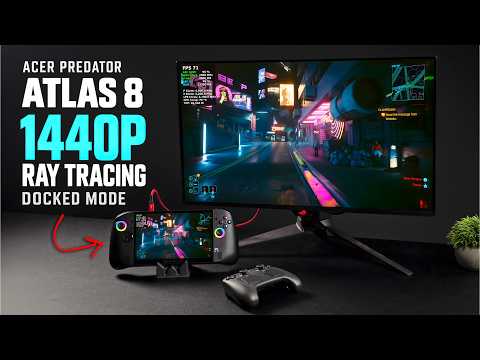 📺 Acer Predator Atlas 8 at 48W: 1440p Ray Tracing Tested!
Acer Predator Atlas 8: 1440p Ray Tracing Gaming Handheld Test
▼
This video tests the Acer Predator Atlas 8, a portable gaming device powered by an Intel Arc A3 Extreme proces…
This video tests the Acer Predator Atlas 8, a portable gaming device powered by an Intel Arc A3 Extreme processor, running games at 1440p with ray tracing enabled while docked. The presenter raises the TDP using ThrottleStop to extract maximum performance, then benchmarks the device and runs a range of demanding titles to evaluate real-world gaming capability.
■ Device Overview and Specs
- Intel Arc A3 Extreme chip with 24 GB RAM, 8-inch 120 Hz IPS display, 80 Wh battery
- Design details including rear trigger locks, macro keys, and D-pad feedback
■ TDP Tuning with ThrottleStop
- Adjusting PL1/PL2 values and turbo time beyond default Predator Sense limits
- Geekbench 7 and 3DMark Time Spy comparisons between default and modified TDP profiles
■ Game Tests at 1440p with Ray Tracing
- Forza Horizon 6, GTA V Enhanced, Hogwarts Legacy, Crimson Desert, and Cyberpunk 2077
- Ray tracing settings, upscaling technologies (XeSS/FSR), and multi-frame generation configurations
■ Pricing, Availability, and Alternatives
- Price positioning above $1,000 and comparisons to MSI Claw 8 and OneXPlayer 3
Ideal for handheld gaming enthusiasts and those considering a portable device with an Intel Arc GPU, this video shows how power tuning and setting adjustments affect performance across multiple demanding titles. A full review of the device is planned for a future video.
 📺 Handheld Gaming Just Got a BIG Update! FSR 4.1 Tested
Testing FSR 4 on ASUS ROG Ally X20 and Ally X Handhelds
▼
FSR 4 has arrived on select AMD-powered handhelds, and this video puts it to the test on the ROG Ally X20 (als…
FSR 4 has arrived on select AMD-powered handhelds, and this video puts it to the test on the ROG Ally X20 (also compatible with the ROG Ally X). Performance and image quality are compared against older FSR versions across several games, covering the setup steps as well as the results.
■ Setup and Installation
- Installing the preview graphics driver through Armory Crate SE's Preview Updates
- Enabling the new FSR toggle in the quick menu before launching a supported game
■ Game-by-Game Comparison
- Cyberpunk 2077: frame rate and image quality between FSR 4 and FSR 2.1 in Performance, Quality, and Balanced modes
- Black Myth: Wukong: scaling slider tests at 75%, 50%, and 33% comparing FSR 4 and FSR 3
- Forza Horizon 5: medium settings at 1080p comparing FSR 4 and FSR 3 across modes, including close-up detail checks
■ Wrap-Up
- Current status of the preview build and notes for other Z1 Extreme handheld makers
This is useful for ROG Ally X/X20 owners and anyone considering an FSR 4 upgrade on a Z2 Extreme handheld. Viewers can learn how to enable the feature, what trade-offs to expect in performance and image quality, and which settings to choose for different games.
 📺 120W of Strix Halo Power in 6.2 Liters! Minisforum T5 Max First Look
Hands-On Review of the Minisforum DeskMini T5 Max: Benchmarks, Gaming, and AI Testing
▼
The Minisforum DeskMini T5 Max packs an AMD Strix Halo platform, a Ryzen AI Max Plus 388 with 48GB of unified …
The Minisforum DeskMini T5 Max packs an AMD Strix Halo platform, a Ryzen AI Max Plus 388 with 48GB of unified memory, and a built-in power supply into a 6.2-liter chassis. I put it through CPU, GPU, AI inference, and gaming benchmarks, and compared its 6400MT/s memory against a faster 8000MT/s system to see what the difference actually costs in real-world performance.
■ Design and Hardware
- Unboxing, chassis layout, cooling design, and front/rear port selection
- Custom mini-ITX motherboard, integrated PSU, and cooler inspection
- Specs overview: 8-core/16-thread Zen 5 CPU, Radeon 860M (40 CUs), 48GB unified memory
■ BIOS and Configuration
- Checking memory speed options and power limits up to 120W TDP
- Allocating 16GB to the integrated GPU from BIOS
■ Benchmark and Real-World Testing
- CPU and GPU synthetic benchmarks against comparable systems
- AI model inference tests with smaller parameter models
- Gaming tests across several titles at 1440p and 1080p settings
- Side-by-side comparison of 6400MT/s vs. 8000MT/s memory impact
■ Sponsor Segment
- Windows 11 Pro and Office key activation walkthrough
This is aimed at anyone considering a compact Strix Halo mini PC for gaming, AI workloads, or general desktop use. It shows how the system performs across everyday and demanding tasks, what to expect from its memory configuration, and which settings matter before you buy.
 📺 Acer Predator Atlas 8 Hands-On First Look! Acer’s First US Handheld Is Here!
Acer Predator Atlas 8 Hands-On: Unboxing, Specs, Software and First Performance Tests
▼
An early look at the Acer Predator Atlas 8, a Windows handheld powered by an Intel Core Ultra Extreme-class ch…
An early look at the Acer Predator Atlas 8, a Windows handheld powered by an Intel Core Ultra Extreme-class chip, following its arrival at Best Buy in the US. The video covers the unboxing experience, hardware design, specifications, bundled software, and a first round of benchmarks and game tests.
■ Unboxing and Hardware
- Box contents, accessories and the hard carrying case included with the Best Buy bundle
- Ports, buttons, macro keys, Hall-effect triggers and overall build and weight
- Display, battery, memory, storage and connectivity specifications
■ Chip and System Software
- Overview of the Intel processor and integrated Arc graphics configuration
- PredatorSense and the game bar: control customization, lighting, fan and performance modes
- Intel graphics settings, including XeSS frame generation and precompiled shaders
■ Benchmarks and Game Testing
- Initial benchmark scores and power profile behavior in different modes
- Game tests at 1200p, covering fighting, racing, action and shooter titles with and without frame generation
- First impressions on the D-pad, ergonomics and speaker quality
This is a useful reference for shoppers comparing current Windows handhelds or considering this model. Viewers gain an understanding of what comes in the box, how the device is configured, and how it behaves in real use, plus prompts for requesting follow-up tests such as battery life before the full review.
 📺 The New M6 Mac Mini Is Secretly A 1440p Gaming PC!
Testing Windows Games on a Base 16GB M6 Mac Mini
▼
The video examines how the base Apple M6 Mac Mini with 16GB RAM runs native macOS games and Windows games that…
The video examines how the base Apple M6 Mac Mini with 16GB RAM runs native macOS games and Windows games that are not officially supported on macOS. It shows local gameplay through Game Hub and related compatibility layers rather than cloud streaming, and reviews performance at 1080p, 1440p, and 4K with settings such as MetalFX, FSR, and frame generation.
■ Native macOS game testing
- Cyberpunk 2077 2.5 with MetalFX upscaling and frame interpolation at 1080p and 1440p
- Observations on ghosting and RAM/VRAM usage on the 16GB model
■ Windows games via Game Hub
- Red Dead Redemption 2 at 1440p with FSR
- Halo 3 at 1440p and high frame rates in offline mode
- Mortal Kombat 1 performance and swap usage
- Ratchet & Clank: Rift Apart with FSR frame generation
- GTA V at 1440p and 4K on an external display
■ Compatibility and limitations
- Anti-cheat, AVX requirements, and titles that did not launch
- Use of Wine, Rosetta, Proton-related layers, and third-party fan control
Viewers interested in Apple Silicon gaming, entry-level Mac capabilities, and compatibility workarounds can use it to understand which game types were tested and what constraints appeared. It is suited to those considering a base 16GB M6 Mac Mini for mixed native and Windows game use.
 📺 This Is The Most Powerful Mini PC AMD Has Ever Built! (192GB RAM)
AMD Ryzen AI Max Plus Pro 495 Mini PC: Unified Memory, AI, and Gaming
▼
An overview of AMD's compact Ryzen AI Halo workstation equipped with the Ryzen AI Max Plus Pro 495, 192 GB uni…
An overview of AMD's compact Ryzen AI Halo workstation equipped with the Ryzen AI Max Plus Pro 495, 192 GB unified memory, and Radeon 865S integrated graphics. It covers hardware specifications, Windows installation, memory allocation for the iGPU, AI model testing, benchmark comparisons with the Max Plus 395, and gaming performance. The sponsor segment demonstrates Windows 11 Pro and Office 2024 activation via URCDKeys.
■ Hardware and specifications
- 16-core Zen 5 CPU, 32 threads, up to 5.2 GHz; Radeon 865S (RDNA 3.5, 40 CUs); XDNA 2 NPU
- 192 GB unified memory at 8533 MT/s; up to 160 GB allocatable to iGPU; Wi-Fi 7 and 10 GbE
- Ports include HDMI, four USB-C (USB4, USB 3.2, power), rear I/O, and a 240 W USB-C power supply
■ Setup, benchmarks, and AI workloads
- Windows 11 Pro installation and driver setup on a unit shipped with Linux
- CPU and GPU benchmark comparisons with Ryzen AI Max Plus 395 at 120 W sustained power
- AI model runs including Llama, Qwen, GPT OSS, Gemma, and larger models requiring more than 96 GB VRAM
■ Gaming and buying context
- 1440p game tests in titles such as Crimson Desert, Forza Horizon 6, Doom The Dark Ages, and Gears of War E-Day
- Discussion of local AI agent costs versus monthly subscriptions and the role of memory pricing
Viewers evaluating compact local AI workstations, mini PC hardware, or Windows-based AI development environments can use the overview to understand the platform's capabilities and configuration options. It also provides context for comparing local AI hardware costs with recurring AI agent subscriptions.
 📺 Intel Destroys AMD in Handhelds - ROG Xbox Ally X20 vs MSI Claw 8 EX
ROG Ally X20 vs MSI Claw 8 EX AI: Handheld Gaming Performance Comparison
▼
A direct comparison of two premium handheld gaming PCs: the ROG Ally X20 with AMD Ryzen AI Z2 Extreme and the …
A direct comparison of two premium handheld gaming PCs: the ROG Ally X20 with AMD Ryzen AI Z2 Extreme and the MSI Claw 8 EX AI with Intel Arc G3 Extreme. The comparison focuses on design, display, hardware specifications, power profiles, synthetic benchmarks, real-game performance, battery life, and pricing.
■ Hardware and display overview
- ROG Ally X20: AMD Ryzen AI Z2 Extreme, 24GB RAM, 7.4-inch OLED 120Hz VRR display, 80Wh battery
- MSI Claw 8 EX AI: Intel Arc G3 Extreme, 32GB RAM, 8-inch IPS 120Hz VRR display, 80Wh battery
- Discussion of upscaling approaches: XeSS on Intel and FSR on AMD
■ Testing methodology
- Synthetic benchmark comparisons at 35W, 25W, and 17W power profiles
- Real-game tests using selected titles at native 1080p and upscaled settings
- Battery-life observations at low-power, 17W, and 25W scenarios
■ Performance and value discussion
- Gameplay performance comparisons across the tested power levels
- Battery runtime comparisons under matched display settings
- Pricing context for the ROG Ally X20 and MSI Claw 8 EX AI Plus
■ Viewer decision points
- Trade-offs between OLED display, Intel Arc graphics performance, and price
- Invitation for viewers to choose based on display preference versus performance preference
The comparison is aimed at viewers considering a high-end handheld gaming PC and looking for a structured overview of performance, battery life, and pricing differences. It covers benchmark and gameplay testing but does not include long-term reliability or teardown analysis. Viewers can use the comparison to identify which device aligns with their priorities before seeking more detailed reviews.
 📺 Nvidia RTX Spark N1X: The Most Powerful iGPU You Can Get Right Now!
NVIDIA RTX Spark N1X Gaming Test on ASUS ProArt P16
▼
This video examines the gaming capability of NVIDIA's new RTX Spark N1X platform in the ASUS ProArt P16. It ou…
This video examines the gaming capability of NVIDIA's new RTX Spark N1X platform in the ASUS ProArt P16. It outlines the chip's 20-core ARM CPU, Blackwell-based GPU, unified memory configuration, and available driver modes before moving into benchmark and real-game testing.
■ Hardware and platform overview
- NVIDIA RTX Spark N1X with a 20-core ARM CPU co-developed with MediaTek
- Blackwell GPU with 6,144 CUDA cores and unified 128GB memory
- ASUS ProArt P16 with configurable GPU memory allocation and up to 85W sustained TDP
- Gaming-ready and Studio driver options
■ Benchmark and gaming coverage
- Synthetic benchmark comparisons with RTX 5070 Laptop GPU and Ryzen AI Max Plus 395/Radeon 8060S
- Game tests at 1080p and 1440p ultra settings, including DLSS and ray tracing scenarios
- Discussion of Prism translation overhead, shader compilation time, and game-specific compatibility
■ Observations and outlook
- Performance varies by title, with some games showing compatibility or frame-pacing issues
- Notes on future small-form-factor devices with higher power limits
This is suitable for viewers interested in ARM-based Windows gaming, NVIDIA's Spark platform, and comparisons with current laptop graphics solutions. It provides an overview of the tested scenarios and the practical considerations around gaming on this new hardware.
 📺 I Put SteamOS on the NEW OLED Xbox Ally X!
Official SteamOS Tested on the ASUS ROG Xbox Ally X20
▼
The ASUS ROG Xbox Ally X20 is a new ROG handheld featuring a 7.4-inch 120Hz Nebula OLED display, TMR sticks, a…
The ASUS ROG Xbox Ally X20 is a new ROG handheld featuring a 7.4-inch 120Hz Nebula OLED display, TMR sticks, a switchable D-pad, 24GB RAM, and an AMD Ryzen AI Z2 Extreme processor. The content tests the official SteamOS build on the device, covering setup adjustments, game performance, and preliminary battery life.
■ Hardware and SteamOS setup
- Specs and design details of the X20
- Working controls, menu behavior, and current limitations such as RGB lighting and the quick menu button
- TDP control through Decky Loader and Simple Decky TDP Control, plus an audio workaround
■ Game performance checks
- 1080p, 900p, and 720p tests across titles including Forza Horizon 6, Red Dead Redemption 2, Mortal Kombat 1, The Witcher 3, Hogwarts Legacy, Spider-Man 2, Doom: The Dark Ages, and Cyberpunk 2077
- TDP ranges and FSR/frame generation settings, along with display characteristics
■ Battery observations
- 80Wh battery estimates at 6–8W, 17W, and 25W TDP levels
It is aimed at viewers considering the X20 or SteamOS on handheld PCs, and provides an overview of compatibility, performance, and battery expectations. Viewers can use it to gauge whether the current SteamOS experience matches their use case and what to watch for before trying it.
 📺 MSI Raider A16 HX Hands-On! 16 Cores + RTX 5080 in a 16" Laptop!
MSI Raider A16HX B8W Gaming Laptop: Specs, Benchmarks, and Gameplay
▼
An overview and hands-on test of the MSI Raider A16HX B8W gaming laptop, covering its design, display, keyboar…
An overview and hands-on test of the MSI Raider A16HX B8W gaming laptop, covering its design, display, keyboard, connectivity, core specifications, MSI Center performance modes, synthetic benchmarks, and real-world gameplay. The system pairs an AMD Ryzen 9 8940HX CPU with an NVIDIA GeForce RTX 5080 laptop GPU and is tested in several modern titles at 1440p.
■ Design and display
- Dragon logo and RGB badge
- 16-inch QHD+ 240Hz IPS-level panel with 100% DCI-P3
■ Input and connectivity
- 24-zone RGB keyboard with transparent WASD keys and a large trackpad
- USB4, USB 3.2, HDMI 2.1, Ethernet, and combo audio jack
■ Hardware and software
- Ryzen 9 8940HX, RTX 5080 laptop GPU, 32GB DDR5, dual M.2, Wi-Fi 7, Bluetooth 5.4, 91.8Wh battery, and Windows 11
- MSI Center performance modes, AI engine, GPU/VRAM offsets, and fan controls
■ Testing and gameplay
- Geekbench and 3DMark benchmark runs
- Gameplay tests in titles such as Red Dead Redemption 2, Doom: The Dark Ages, Mortal Kombat 1, Crimson Desert, and Forza Horizon 6 at 1440p with various DLSS and ray tracing settings
Viewers considering a high-end 16-inch gaming laptop can use this overview to understand the system’s specifications, features, and the areas tested. The content focuses on hardware and gameplay observations; pricing and long-term reliability are not covered. Additional details are referenced in the description, and further test requests can be made in the comments.
📄 このページの紹介文は AI が独自に生成したものであり、著作権をはじめとする他者の権利(商標権・名誉権・プライバシー等)を侵害しないよう配慮しています。動画の著作権は各作成者に帰属します。